Tiny Tales: The Handwriting Font That Actually Keeps Your Digital Life Organized
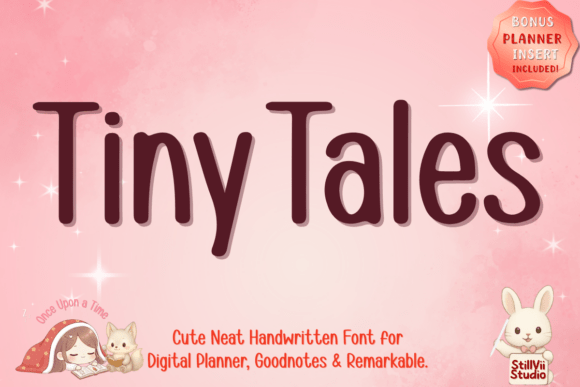
You know that feeling when you open a new digital planner or notebook, ready to capture brilliant ideas, and then stare at the blinking cursor wondering which font won’t make your pages look like a chaotic mess? That’s exactly the problem Tiny Tales solves. It’s not just another pretty script—it’s a minimalist handwriting font designed specifically for the way we actually work, create, and plan in digital spaces. Think of it as the reliable pen you always reach for, but in font form.
Why Clarity Beats Fancy Every Time
Most decorative fonts sacrifice readability for style. Tiny Tales flips that script. Its clean, consistent letterforms are engineered for unbeatable clarity, whether you’re zooming out on a full planner page or squinting at tiny margin notes. This isn’t about calligraphic flourishes; it’s about functional beauty. When you’re rushing to jot down meeting notes in Notability or color-coding a study guide in Goodnotes, you need a font that disappears into the background and lets your content shine. That’s the real magic here—it’s charming without being distracting.
Where Tiny Tales Becomes Your Secret Weapon
Let’s get specific. Imagine you’re a freelance graphic designer using Procreate for client mood boards. You need handwritten annotations that look professional yet approachable—something that says “I’m creative but also organized.” Tiny Tales fits that brief perfectly. Its neat script works beautifully for labeling elements, adding quick notes, or creating custom digital stickers that feel personal and polished. It bridges the gap between artistic expression and clear communication.
Or consider the student buried in lecture notes. With Remarkable or an iPad, you’re constantly switching between writing, highlighting, and organizing. A font that’s easy to read at a glance isn’t a luxury; it’s a necessity. Tiny Tales helps create aesthetic summaries that are actually useful for revision, not just pretty to look at. The slightly rounded, friendly characters reduce visual fatigue during long study sessions, making dense information feel more approachable.
Real Scenarios, Real Results
Think about the small business owner creating product labels or packaging mockups. Handwritten fonts often look too whimsical or too formal for artisanal brands. Tiny Tales strikes that sweet spot—adorable enough to convey personality, but clean enough to maintain professionalism. It’s ideal for bakery labels, boutique tags, or even thank-you notes for e-commerce orders. Customers notice those thoughtful touches.
For content creators, consistency is key. Whether you’re designing YouTube thumbnails, Instagram quotes, or Pinterest graphics, a cohesive visual style builds brand recognition. Tiny Tales offers that consistent, friendly aesthetic across platforms. Its minimalist design ensures text remains legible even at small sizes or against busy backgrounds—crucial for social media where first impressions happen in milliseconds.
Beyond the Obvious Uses
Here’s where it gets interesting. Educators use Tiny Tales to create engaging worksheets and classroom materials that feel less sterile than standard fonts. Parents might use it for chore charts or family calendars in digital planning apps. Hobbyists designing custom wedding invitations or party planners find it adds a personal touch without the cost of professional calligraphy. The font adapts to your context, not the other way around.
The practical benefits extend to everyday productivity too. Habit trackers and to-do lists in apps like Goodnotes become more inviting when written in a font that feels approachable. There’s psychological research suggesting that aesthetically pleasing tools increase engagement—Tiny Tales taps into that. When your digital planner looks like something you want to open, you’re more likely to use it consistently.
Choosing the Right Tool for Your Needs
Before diving in, consider your primary use case. If you need a font for dense, academic note-taking with lots of subscripts and symbols, test how Tiny Tales handles those elements. For most planning and creative projects, its clarity shines. If you’re working across multiple devices, check compatibility with your preferred apps—though Tiny Tales is designed with popular platforms like Goodnotes and Notability in mind.
Also think about scale. This font excels at body text and moderate headings, but if you need ultra-large display typography, you might pair it with a complementary sans-serif for impact. The goal isn’t to use one font everywhere, but to have a reliable workhorse that covers 80% of your needs beautifully.
Making It Work for You
The best tools become extensions of your workflow. Start by applying Tiny Tales to one specific project—maybe your weekly meal planner or a client mood board. Notice how it affects your engagement and the final output. Does it make the process more enjoyable? Is the result clearer and more organized? Those are the real measures of value.
Remember, a font is just one piece of the puzzle. Pair Tiny Tales with good color contrast, thoughtful layout, and intentional whitespace. Its minimalist design actually encourages better design habits because it doesn’t hide behind flourishes. What you write—and how you organize it—takes center stage.
In a world overflowing with overly complex design tools, there’s something refreshing about a font that does one thing exceptionally well. Tiny Tales isn’t trying to be everything to everyone. It’s for those moments when you need clarity, charm, and organization in one neat package—whether you’re planning a business launch, studying for exams, or simply trying to keep your digital life beautifully under control. And sometimes, that’s exactly what you need.